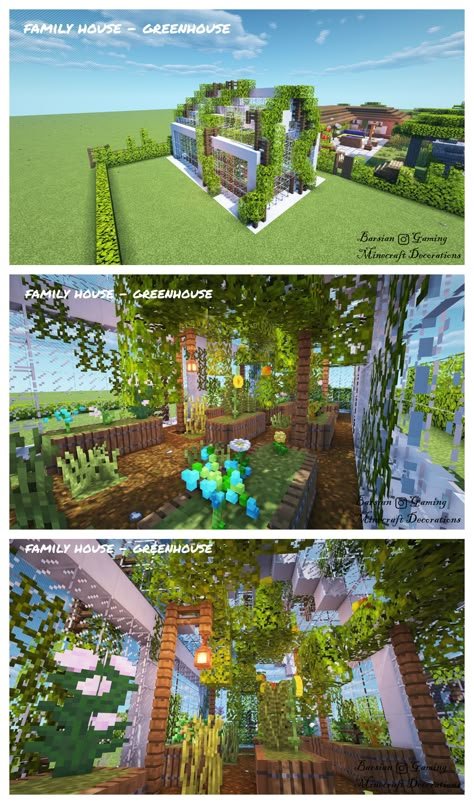
Minecraft isn't just a game; it's a boundless canvas where imagination takes blocky form. From sprawling medieval castles to futuristic sci-fi hubs, the creative potential is limitless. But even the most ambitious architects sometimes need a starting point, a guiding hand, or a spark of inspiration. That's precisely where Popular Minecraft Blueprint Collections come into play—offering meticulously designed plans that transform daunting projects into achievable triumphs.
These collections aren't merely step-by-step instructions; they are vaults of creativity, allowing players to construct everything from cozy starter homes to intricate, multi-component villages, saving countless hours and sparking new ideas. Whether you're a veteran builder seeking grand new challenges or a newcomer eager to erect your first impressive structure, blueprints open up a world of organized, imaginative building.
At a Glance: Building Dreams with Blueprints
- What They Are: Pre-designed plans or templates for Minecraft structures, often detailing block types and counts.
- Why Use Them: Save time, get inspiration, tackle complex builds, learn new techniques, create safe bases, and add aesthetic value to your world.
- Where to Find Them: Online communities like Planet Minecraft, fan-created sites, and dedicated forums.
- Types of Collections: Ranging from themed villages (e.g., Dwarven, Elven) to functional assets (stalls, rocks), grand palaces, and educational builds (mob farms).
- Key Considerations: Hardware optimization, understanding material lists, and adapting blueprints to your unique world.
- Beyond Copying: Blueprints are a launchpad for customization, collaboration, and mastering advanced building skills.
What Exactly Are Minecraft Blueprints? Your Architectural Toolkit Explained
At its heart, a Minecraft blueprint is a plan or design that players utilize to construct in-game structures. Think of it like an architect's schematic for a real-world building, but translated into the blocky language of Minecraft. These blueprints can range from simple diagrams outlining a basic house to complex, multi-page guides for colossal castles, intricate machinery, or entire city districts. Many even come with detailed block counts, giving you a precise shopping list before you even lay the first block.
Why are these blueprints so popular? Building structures like castles, homes, and towers is a core, challenging, and incredibly rewarding aspect of Minecraft. These creations aren't just for show; they serve practical purposes—providing safe bases for storing precious items, protecting you from hostile mobs, and offering aesthetic value that truly makes your world feel like your own. Blueprints empower you to tackle these challenges with greater ease and creativity, offering a framework to experiment with various techniques and materials to construct diverse structures, from humble cottages to sprawling metropolises.
Fan-created resources like Minecraft Building Inc. define blueprints as essential tools for creating shelter and customizing worlds. They highlight how players use these plans for everything from houses and castles to towers and entire village buildings. This shared passion for building is what fuels the community around these valuable collections.
Diving Deep into Popular Blueprint Collections: A Builder's Treasure Trove
The Minecraft community thrives on creativity, and nowhere is this more evident than in the vast array of blueprint collections available. These aren't just random builds; they're often curated sets that provide a cohesive aesthetic or tackle specific building challenges. Whether you're looking to populate a fantasy realm or construct a practical survival base, there's likely a collection designed for you.
Let's explore some of the most inspiring and widely used collections that have captivated builders across the globe:
Themed Villages & Immersive Architectural Sets
Many creators specialize in collections that evoke distinct themes, allowing players to easily populate their worlds with consistent architectural styles. LadyO, a prolific contributor on Planet Minecraft, stands out for her diverse and imaginative bundles. Her work includes:
- "Dwarven buildings": Perfect for creating underground cities, mountain strongholds, or robust, stone-hewn settlements.
- "Felinis tribe": Offering unique structures for a feline-inspired civilization, bringing a distinctive cultural touch to your world.
- "Minotaurus village": Designs that conjure a sense of ancient, powerful beings, perhaps ideal for labyrinthine complexes or imposing defensive outposts.
- "Elven town": Graceful, nature-integrated builds that fit perfectly within forests or elevated platforms, capturing the ethereal beauty of elven architecture.
- "HUM - Medieval Service Buildings Bundle - 2" and "1": Essential for fleshing out any medieval town with functional structures like blacksmiths, bakeries, and taverns, adding depth and realism to your historical builds.
- "HUM - Medieval houses bundle": Provides a range of housing options that maintain a consistent aesthetic, making it easy to create a charming, bustling medieval village.
These themed bundles demonstrate how Explore Minecraft blueprints can transform a simple landscape into a living, breathing world with a rich backstory.
Specialized Assets & Terrain Enhancers
Beyond full structures, some collections focus on smaller, crucial details that bring a world to life. These "asset packs" are invaluable for adding realism and variety to your environments.
- Valtury's "Blueprints Minecraft Maps - Asset pack": Offers over 300 stalls & tents, perfect for bustling marketplaces, temporary encampments, or festival grounds. These smaller, modular pieces make it easy to add dynamic elements to any scene.
- Valtury's "Asset pack | Terrain Rocks": With over 160 distinct rock formations, this collection allows for naturalistic landscaping, breaking up flat terrain and adding geological interest to mountains, caves, and plains.
- Vextrosity's "100 Alien Rocks | Asset Pack": For those venturing into sci-fi or otherworldly builds, this pack provides unique, fantastical rock formations to create truly alien landscapes.
These collections highlight the granular detail that can be achieved, proving that blueprints aren't just for grand buildings but also for the environmental storytelling that makes a world truly immersive.
Grand Projects & Iconic Landmarks
Sometimes, the ambition is simply to build something enormous and awe-inspiring. Certain blueprint collections cater to these monumental aspirations.
- "The Great Palace Library Update #4" by zOrg: This project showcases the World's LARGEST Library, Palace, & Gardens. While not a "collection" in the sense of many small items, such colossal undertakings often generate a series of blueprints or schematics as they evolve, offering immense inspiration for those dreaming big. Recreating something of this scale requires immense dedication, often spanning updates and years of work.
- "One Story Brick Mansion" by johnnybeokay: A more manageable but still impressive project, this mansion blueprint provides a solid plan for a luxurious and elegant home, a significant upgrade from a basic starter house.
These examples demonstrate the sheer scale and complexity that blueprints can help you achieve, pushing the boundaries of what's possible within Minecraft's blocky confines.
Functional & Educational Builds
Not all blueprints are purely aesthetic. Many serve practical purposes, helping players optimize gameplay or learn new mechanics.
- "Mob Farms" by TTVMaxGravesVA: This collection provides designs for efficient mob farms, crucial for gathering resources, experience points, and rare drops in survival mode. These functional blueprints are highly sought after by players looking to improve their in-game efficiency.
- "The Homestead pack" by Jaynater: Featuring 2 Houses, 1 stable, a Shed, and an Outhouse, this collection is perfect for setting up a functional and self-sufficient survival base. It covers essential needs while maintaining a cohesive, rustic aesthetic.
These collections are invaluable for players who want to bridge the gap between creative building and practical survival, offering plans that enhance both their world's appearance and functionality.
Historical & Artistic Renditions
Finally, some blueprints draw inspiration from real-world history or specific artistic visions, allowing players to replicate iconic styles.
- "McNoodlor 2017 Castle Collection" by LadyO: This collection, despite being a few years old, continues to inspire with its detailed and robust castle designs. Castles are a classic Minecraft build, and well-designed blueprints like these provide both challenge and satisfaction for builders.
The breadth of these popular collections underscores the incredible versatility and community-driven nature of Minecraft building. Whether you're seeking functional designs, artistic inspiration, or simply a head start on a complex project, there's a blueprint collection waiting to help you realize your vision.
Finding Your Next Masterpiece: Where to Discover Blueprint Collections
With such a rich variety of blueprints available, the next logical question is: where do you find them? The Minecraft community is vibrant and collaborative, offering several excellent avenues for discovery.
Planet Minecraft: The Epicenter of Creativity
The context research heavily features Planet Minecraft, and for good reason. It's a massive hub for all things Minecraft, including maps, texture packs, skins, and, of course, blueprints. Many of the creators mentioned earlier, like LadyO, Valtury, Vextrosity, Jaynater, zOrg, and TTVMaxGravesVA, share their collections and projects here.
- What to Expect: A vast, searchable database of user-created content. You'll find everything from single-structure schematics to entire world saves featuring multiple blueprint designs.
- Benefits: Direct downloads, creator profiles, community ratings, and comments that can help you assess the quality and usability of a blueprint.
- Tips: Use specific search terms like "blueprint collection," "asset pack," or the type of structure you're looking for (e.g., "medieval village blueprint"). Pay attention to upload dates and update logs to ensure compatibility with your Minecraft version.
Fan-Created Blogs and Resource Sites
Beyond the giant community portals, smaller, dedicated sites often curate and organize blueprints. Minecraft Building Inc. is a prime example of such a resource.
- Minecraft Building Inc.: This fan-created blog serves as a valuable resource for Minecraft building ideas, templates, blueprints, seeds, pixel art, and skins. It’s operated by a small group of enthusiasts who are passionate about sharing builds and tutorials, always crediting the original creators.
- What to Expect: Curated lists, tutorials, and often helpful categories that break down blueprints by type (houses, castles, towers, village buildings). Some even include block counts directly within their articles.
- Important Note: Minecraft Building Inc. explicitly states it is not an official Minecraft, Mojang, or Microsoft site, nor is it associated with or supported by them. They also participate in affiliate advertising programs (like Amazon Services LLC Associates Program), earning small commissions on referral purchases at no additional cost to the buyer. This transparency is key to understanding the nature of many fan-run sites. Always verify the source and content when using external resources.
- Benefits: Often more focused content, easy-to-digest guides, and direct links to blueprint files or build instructions.
Community Forums, YouTube, and Dedicated Build Servers
- Minecraft Forums & Reddit: Active communities where players share their creations, ask for advice, and often link to their blueprint designs. Subreddits like r/Minecraftbuilds are excellent places to discover new ideas.
- YouTube: Many builders create detailed tutorials and showcases of their blueprints, allowing you to see the finished product and even follow along with construction guides. Search for "Minecraft blueprint tutorial" or "Minecraft build ideas."
- Build Servers: Some Minecraft multiplayer servers are dedicated entirely to creative building, showcasing player creations and sometimes providing schematics or instructions for replicating popular builds.
When exploring these resources, remember to always respect intellectual property. The content on sites like Minecraft Building Inc. is proprietary and intended solely for personal, non-commercial use, protected by copyright. Always credit creators if you adapt or share their designs.
Beyond the Blueprint: Essential Considerations for Builders
Having a blueprint is a fantastic start, but successful execution requires more than just a plan. Several factors can significantly impact your building experience, from the hardware powering your game to how you approach the construction process itself.
Hardware Matters: Building Without Lag
Minecraft, especially with large builds, intricate blueprints, or when enhancing your game with Minecraft mods or multiplayer, can be surprisingly demanding on your computer. Good hardware isn't just a luxury; it's essential for a smooth and enjoyable building experience.
- Fast Processor (CPU): A powerful CPU handles the complex calculations involved in rendering vast worlds and numerous blocks. A faster processor means less stuttering and quicker loading times, allowing you to navigate and build without frustrating delays.
- Sufficient RAM (Memory): Minecraft is a memory hog, particularly if you're loading large blueprint files, using high-resolution texture packs, or running multiple mods. Aim for at least 8GB of RAM, with 16GB being ideal for serious builders and mod users. More RAM allows the game to store more world data in active memory, leading to smoother chunk loading and overall performance.
- Dedicated Graphics Card (GPU): While Minecraft can run on integrated graphics, a dedicated graphics card dramatically improves visual fidelity and frame rates. It offloads rendering tasks from your CPU, allowing for better shaders, higher draw distances, and a much more fluid visual experience, which is crucial when admiring your intricate blueprint creations.
- Quality Peripherals (Mouse, Keyboard, Monitor): While not directly impacting game performance, good peripherals enhance your control and comfort. A responsive mouse with programmable buttons can speed up block placement and tool switching, while a comfortable keyboard reduces fatigue during long building sessions. A high-resolution monitor allows you to see more of your build clearly, aiding in precision.
Investing in optimizing your hardware for Minecraft ensures that your building sessions are about creativity, not frustration caused by lag or poor visuals.
Understanding Block Counts and Materials: Planning Your Resources
Many high-quality blueprints come with detailed block lists. This information is a goldmine for efficient building.
- Resource Gathering: Knowing the exact number and type of blocks required allows you to plan your resource gathering missions effectively. You won't run out of a crucial material halfway through a massive wall, saving you countless trips back to the quarry or farm.
- Pre-Crafting: With a block list, you can pre-craft necessary items like stairs, slabs, fences, and tools, ensuring you have everything on hand before construction begins.
- Material Alternatives: If a blueprint calls for a rare or difficult-to-obtain block, the list can help you identify suitable alternatives that maintain the aesthetic or structural integrity of the design.
Scaling and Adaptation: Making it Your Own
Rarely will a blueprint fit your world perfectly without any adjustments. Learning to scale and adapt designs is a valuable skill.
- Size Adjustments: You might need to make a building larger or smaller to fit a specific plot of land or to match the scale of surrounding structures.
- Terraforming Integration: Blueprints often assume flat land. Be prepared to terraform the surrounding terrain to accommodate your build, or integrate the build into existing mountains, rivers, or valleys.
- Style Modification: While blueprints provide a style, feel free to swap out certain blocks for others that better match your world's palette or personal preferences. Maybe you prefer dark oak to spruce, or stone bricks to cobblestone. The blueprint is a guide, not an unbreakable law.
These considerations elevate you from a mere blueprint follower to a true Minecraft architect, capable of integrating complex designs seamlessly into your unique world.
Making Blueprint Collections Work for You: Practical Tips for Builders
Having access to incredible blueprint collections is one thing; effectively using them to create breathtaking structures is another. Here's how to maximize your blueprint-building experience and develop your skills along the way.
Start Small, Dream Big
It's tempting to jump straight into zOrg's colossal Palace Library, but tackling smaller projects first can build confidence and foundational skills.
- Master the Basics: Begin with a simple house, a detailed stall, or a small bridge from a collection. Learn how different block types interact, how to manage inventories, and efficient placement techniques.
- Progress Gradually: As your confidence grows, move on to more complex structures like a modest castle or a themed building from LadyO's bundles. Each successful build reinforces your understanding and expands your repertoire.
Utilize Tools and Commands Wisely
Minecraft offers in-game tools and commands that can significantly aid in blueprint construction, especially for larger builds.
- WorldEdit & Litematica (Mods): For Java Edition players, mods like WorldEdit allow you to quickly copy, paste, rotate, and fill large areas with blocks. Litematica creates an in-game overlay of your blueprint, showing you exactly where each block goes, essentially giving you a holographic guide. These tools are incredibly powerful for accelerating complex builds.
/fillCommand: In vanilla Minecraft, the/fillcommand (and/setblock) can place or replace large cuboid selections of blocks instantly. This is perfect for laying down foundations or solid walls much faster than manual placement./cloneCommand: The/clonecommand allows you to duplicate sections of your build, which is invaluable for symmetrical structures or repeating elements.
While these tools are powerful, they require some learning. However, mastering them can dramatically speed up your building process, allowing you to focus on the creative aspects.
Collaborate with Fellow Builders
Minecraft is inherently social, and building can be a fantastic collaborative effort.
- Multiplayer Magic: Invite friends to help you construct a large blueprint. Divide tasks: one person gathers resources, another focuses on foundations, and a third works on detailing. This not only speeds up the process but also adds a fun, shared experience to building.
- Shared Vision: Collaborating on a blueprint can lead to new ideas and interpretations, as each person brings their unique building style and problem-solving approach to the project. Enhancing your game with Minecraft mods or multiplayer experiences can turn solo projects into grand shared adventures.
Always Backup Your World
This cannot be stressed enough, especially when undertaking large or intricate blueprint projects.
- Safeguard Your Progress: Before starting a major construction, make a copy of your world save. If something goes wrong (accidental TNT, griefing, or simply disliking the direction of a build), you can easily revert to an earlier state without losing hours of work.
- Experiment Freely: With a backup, you can experiment more boldly. Try out different materials, structural changes, or even large-scale terraforming without fear of irreversible damage to your main save.
Experiment and Customize: Make It Truly Yours
Blueprints are fantastic guides, but they are not restrictive covenants. The true magic of Minecraft building lies in personalization.
- Add Your Flair: Once the basic structure is complete, consider how you can add your unique touch. Change the roof material, add custom landscaping, build unique interiors, or incorporate secret passages.
- Blend Collections: Don't be afraid to combine elements from different blueprint collections. Perhaps LadyO's Dwarven buildings could connect to a repurposed Valtury terrain rock formation, creating a custom, hybrid environment.
- Learn and Adapt: As you follow blueprints, pay attention to the techniques used by the original creators. How do they achieve certain roof shapes? What block combinations do they use for texture? Apply these learned techniques to your own original builds.
By following these practical tips, you won't just be copying blueprints; you'll be using them as a springboard to develop your own building prowess and create worlds that truly reflect your unique vision.
Common Questions About Minecraft Blueprints
As you dive into the world of Minecraft blueprint collections, a few common questions often arise. Let's clarify some key points to help you build with confidence.
Are Blueprints Considered Cheating?
No, generally, blueprints are not considered cheating. They are tools and guides, much like a recipe in cooking or a diagram for assembling furniture. They provide a plan, but the player still has to gather all the resources, place every block, and often adapt the design to their world. Using blueprints enhances the creative aspect of the game by allowing players to tackle more ambitious projects or learn new building techniques efficiently. The effort of actual construction remains.
Can I Import Blueprints Directly into My Game?
This depends on the format of the blueprint.
- Schematic Files (e.g., .schematic, .litematic): These can be directly imported into your game using third-party tools or mods like WorldEdit or Litematica. These mods essentially paste the entire structure into your world. This is common on PC (Java Edition).
- Image or Diagram Blueprints: Many blueprints are presented as images (e.g., pixel art grids, layered diagrams) or written instructions. These require you to manually place each block, using the image as a visual reference. This method is universal across all Minecraft versions.
So, while some formats allow direct import with tools, many blueprints are intended for manual construction.
Do Blueprints Work in All Game Versions?
Not always. The primary concern is block availability. If a blueprint uses blocks introduced in a newer version of Minecraft, it won't be perfectly reproducible in an older version. Similarly, some blueprints might be designed for specific game mechanics or modded environments that might not exist in your version.
- Always Check Compatibility: Reputable blueprint providers will usually state which Minecraft version their designs are compatible with. If not, look at the blocks used; if you see blocks you don't recognize from your game version, proceed with caution or expect to make substitutions.
- Java vs. Bedrock: While many structural concepts translate, block IDs and certain mechanics differ between Java and Bedrock editions. A blueprint designed specifically for Java Edition might require minor adjustments to work perfectly in Bedrock, and vice-versa.
How Do I Share My Own Blueprint Collections?
If you've created an impressive build and want to share its blueprint with the community, here's how:
- Document Your Build: Take clear screenshots from multiple angles, ideally with a logical progression of layers or steps.
- Create a Block List: Detail all the materials and quantities needed.
- Generate a Schematic (Optional but Recommended for PC): If you're on Java Edition, use a mod like WorldEdit or Litematica to save your build as a schematic file. This allows others to import it directly.
- Write Clear Instructions: Explain any unique building techniques, challenges, or tips for replicating your design.
- Upload to Community Sites: Platforms like Planet Minecraft, CurseForge, or fan blogs like Minecraft Building Inc. (following their submission guidelines, if any) are excellent places to share your creations. Be sure to credit yourself and provide all necessary information.
Sharing your work not only contributes to the vibrant Minecraft community but also helps you get feedback and recognition for your building talents.
Elevating Your Craft: Advanced Building with Blueprint Collections
Once you've mastered the basics of following blueprints, you're ready to transcend simple replication and truly make these collections your own. Blueprints aren't just for individual structures; they can be integrated into a larger, more ambitious vision for your Minecraft world.
Orchestrating Multiple Collections for Complex Scenes
Imagine a medieval port town. You could use LadyO's "Medieval houses bundle" for the residential areas, incorporate Valtury's "stalls & tents" for the marketplace, and perhaps adapt elements from a specific castle blueprint for a defensive fort overlooking the harbor.
- Thematic Cohesion: The key here is to select collections that share a similar aesthetic or can be subtly modified to fit a unified theme. This creates a cohesive, believable environment rather than a patchwork of disparate builds.
- Functional Integration: Consider how different structures from various collections interact. How do the roads connect? Where are the service buildings relative to the homes? This holistic approach transforms a collection of buildings into a living settlement.
Integrating Custom Terrain with Blueprint Structures
Many blueprints assume flat land, but the most visually striking builds are often seamlessly integrated into dynamic terrain.
- Terraforming as a Foundation: Use tools like WorldEdit or manual terraforming to sculpt hills, valleys, rivers, or cliffs before placing your blueprint structures. This allows you to embed buildings into the landscape, making them feel organic.
- Blueprint Adaptation: Don't be afraid to modify the base of a blueprint to conform to uneven terrain. A house might have a raised foundation on one side or steps leading down on another, making it feel perfectly at home in its environment.
- Natural Elements: Combine structures with Valtury's "Terrain Rocks" or Vextrosity's "Alien Rocks" to create natural barriers, picturesque vistas, or unique geological features around your builds, enriching the overall scene.
For those eager to push their creative boundaries, mastering advanced Minecraft building techniques involves this kind of thoughtful integration and modification.
Lore Building and Narrative Through Construction
Every great world tells a story. Your blueprint collections can be powerful tools for crafting narrative and lore within your Minecraft realm.
- Historical Progression: Use different blueprint styles to suggest a timeline. Perhaps an ancient, weathered castle blueprint stands sentinel over a newer, bustling village built from medieval house plans.
- Cultural Identity: LadyO's "Dwarven," "Felinis," or "Minotaurus" collections aren't just building styles; they represent distinct cultures. By placing these thoughtfully, you can imply the history, conflicts, and interactions between different groups in your world.
- Functional Storytelling: A dilapidated farm blueprint near a thriving mob farm could tell a story of agricultural struggle contrasted with automated efficiency, tying into essential Minecraft survival strategies and resource management.
By thinking of your builds as chapters in a grander story, you elevate your use of blueprints from construction to world-building, creating a truly immersive and unique experience.
Your Next Adventure Awaits: Building a World of Your Own
The world of Minecraft building is an ever-expanding horizon, and popular blueprint collections are your most valuable allies in navigating its vastness. From LadyO's intricate medieval villages to Valtury's essential asset packs and zOrg's monumental palace, these collections offer not just plans, but also inspiration, guidance, and a shortcut to realizing even your grandest visions.
Remember, a blueprint is a starting point, not an end. It's an invitation to explore, to learn, and most importantly, to infuse your personal touch into every block. Whether you're optimizing your hardware for seamless construction, meticulously gathering resources, or collaborating with friends on a multiplayer masterpiece, the journey of building in Minecraft is one of continuous discovery and boundless creativity. So grab your pickaxe, consult your next blueprint, and start shaping the world you've always dreamed of. Your next adventure in block-by-block creation is just waiting to begin.